



Student Learning Conference Registration Page (Formerly known as Parent Teacher Conferences)
SCT STUDENT LEARNING CONFERENCE REGISTRATION OPENS ON MONDAY MAY 4TH AT 7:30AM
REGISTRATION CLOSES ON Tuesday, May 12th at 11:59 pm.
THE BOOKING LINK WILL BE LIVE AT 7:30AM MONDAY MAY 4TH
📝 How to Book a Meeting with Your Student’s Teachers
Step 1: Go to the Booking Page
Click this link to start:
SCT Booking Page
Step 2: Choose a Teacher
- Click “Select Staff” to pick a teacher.
- Not sure who teaches your student? Log in to MyEd to view your student’s schedule and teachers.
- MyEd link
https://myeducation.gov.bc.ca/aspen-login/?deploymentId=aspen - Help Logging in to MyEd
https://media.vsb.bc.ca/media/Default/frf/91/First Time Logging In Wifi.pdf
Step 3: Pick the Date
- Scroll to May 14th, 2026 on the calendar.
Step 4: Choose a Time
- Select an available time slot to meet with the teacher.
- If the staff member you are hoping to book is not available, please email them to coordinate an alternate time to meet. The list of staff contact information can be found here https://www.vsb.bc.ca/sir-charles-tupper/page/3567/our-staff
Step 5: Enter Your Info
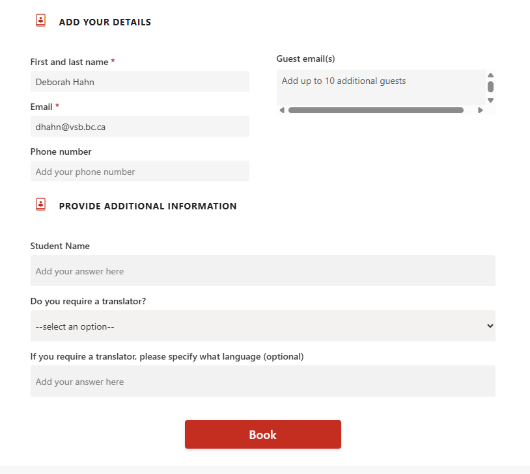 Fill out the Personal Information section.
Step 6: Add Student Details
- Include your student’s name.
- Let us know if a translator is needed.
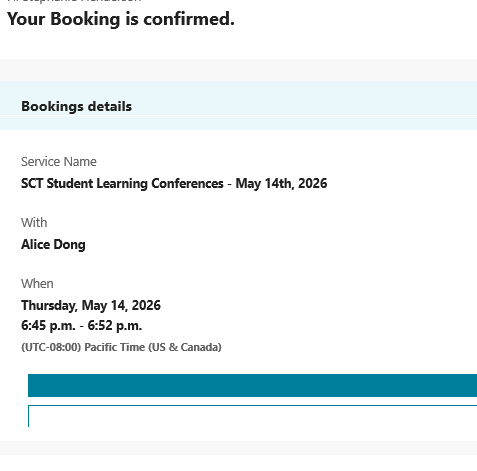
Step 7: Confirm Your Booking
- Click “Book”.
- You’ll receive a confirmation email with your meeting link.
❓ Questions?
Email us at: tupper@vsb.bc.ca